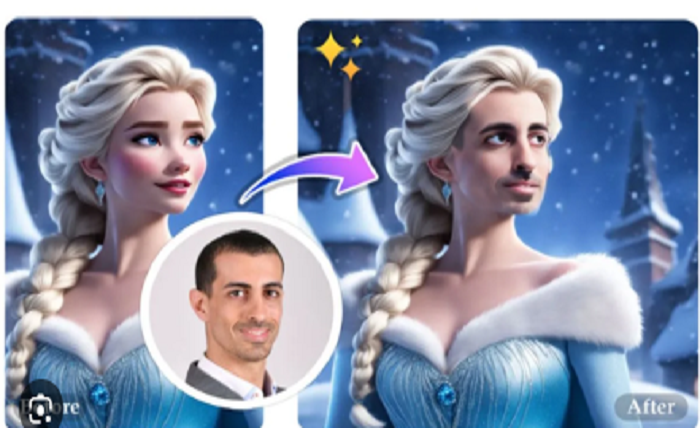
In the age of AI, “face swap” has moved from a niche photo-editing trick to a powerful and accessible tool for images, GIFs, and videos. At its core, face swap means replacing one person’s face in an image or video with another person’s — allowing for creative, humorous, or transformative edits.
One of the most notable free, browser-based platforms for this purpose is Vidwud. According to its website, Vidwud supports photo face-swap, multiple face swap video online free (including clips, animations, GIFs, and even movie/animation videos), and multi-face swap (allowing replacement of multiple faces in a single image or video).
With just a few clicks — upload your original photo or video, upload the target face/photo, press “Swap Face Now,” and download the result — Vidwud promises “fast generation,” “natural & realistic results,” and a fully online experience with no software installation required.
How the Tool Works (According to Vidwud)
Vidwud and similar AI-based face-swap tools rely on automated detection and blending:
- Face detection: The tool analyzes the uploaded media (photo, GIF, or video) to identify faces. For group photos/videos, it identifies each face, enabling multi-face swaps.
- Face replacement / blending: Once you choose which face(s) to replace and provide a target face image, the AI attempts to match expressions, skin tone, lighting, angle, and other visual attributes so that the swapped face looks naturally integrated.
- Generation & Download: The processed result — whether a new photo, GIF, or video — becomes available for download. Vidwud claims processing is quick: seconds for images, and moderately quick for video.
Because it’s online and browser-based, Vidwud works on desktop or mobile, removing the need for powerful hardware or specialized software.
Why People Use Face Swap — From Fun to Creative Work
The ease and versatility of face-swap tools have opened up many use cases beyond just memes:
- Social-media creativity and memes: People love to swap friends’ faces onto famous movie scenes, celebrities, or viral GIFs. Swapping faces in existing video clips or popular animations allows for humor, parody, and creative expression.
- Group photos or videos made fun: Multi-face swap is ideal for group photos or group videos — you can replace multiple faces at once in a single click, turning ordinary photos into absurd or funny group portraits.
- DIY marketing or ad mockups: For small businesses or creators, face swap can be a way to create promotional visuals without hiring models — you can place any face onto a stock body or scene, producing custom marketing images or videos.
- Artistic experiments and storytelling: Beyond funny memes, face swap can be used to reimagine images, create alternative scenarios, or produce stylized content by combining face and body in unconventional ways.
Since Vidwud is free, works on any device with a browser, and supports multiple formats (images, GIFs, videos, animations, even movie clips), it lowers the barrier to entry — anyone can try it, even without editing skills.
Technical & Ethical Considerations: What’s Behind “Free & Easy”
While free online face-swap tools bring convenience, there are both technical limitations and deeper social/ethical implications to be aware of.
Technical limitations:
- Most face-swap AI tools rely on frame-by-frame processing for videos. According to research on face-swap algorithms in video domains, this often leads to issues such as “jittering,” distorted borders (especially when face proportions differ), or visible artifacts over time — particularly in complex scenes or side-profiles.
- For multiple faces, blending each replacement convincingly — making lighting and skin tone match, aligning head pose and expressions — is more challenging; results may look less realistic when there are many faces or dynamic movements.
Ethical & societal concerns:
- Because face swap can produce highly realistic results, it can be misused — for impersonation, misinformation, defamation, or spreading deepfakes. The mere existence of tools that “keep people’s faces intact but change identity” raises serious concerns.
- Privacy: Using someone’s face without consent — especially in videos or publicly shared media — can violate privacy and personal rights.
- Trust in media: As face-swap / deepfake technology becomes more accessible, it undermines the reliability of photos/videos as proofs or evidence. This can erode public trust in media, as experts have shown that detecting deepfakes is becoming increasingly difficult.
Thus, while tools like Vidwud make face swap video accessible and fun, users need to be mindful — using such tools responsibly, ethically, and (when involving others) with consent.
How to Use Vidwud: A Simple 3-Step Guide
Using Vidwud’s free face-swap functionality is quite simple:
- Upload the original media — a photo (JPG, PNG, WebP), or a video/GIF (MP4, WebM, etc.).
- Upload the target face image — the face you want to swap in.
- Click “Swap Face Now” — the AI processes the media; once done, download your face-swapped photo / video / GIF.
For group photos or videos with multiple people, use the “multiple face swap” option to replace several faces at once.
No download or installation is needed — everything is done online, via your browser, which makes it easy even on mobile or low-power devices.
Final Thoughts: Powerful, Fun — But Use With Care
Free online face-swap tools like Vidwud open up a world of creative possibilities — from goofy memes and social-media fun to ad mockups and experimental media art. Their ease, accessibility, and versatility make them appealing to users of all backgrounds.
Yet with this power comes responsibility. Because face-swap and deepfake technology can easily be misused, it’s important to approach it ethically: only swap faces when you have permission; avoid creating misleading or harmful content; respect privacy; and be aware of the broader implications on trust, identity, and media authenticity.